

...and I am not using all of them!
Next to buying shoes, makeups and dresses, I buy domains. Yes, you read it right, I mean domains, and if I own a dotcom you can bet that most likely I also own the dotnet and the dotinfo. I know it sounds like crazy but as most of you know I am crazy with shoes and makeup and what have you...so why should it be different with domains?! Anyway! I found this interesting webhosting site...and well on the contrary to what most of you expect which I presume is to find webhosting plans and offers there, you will find there instead options on what to do with your domains...especially those which you are not currently using. Also you get to read there reasons on why people buy several domains...and good thing I found some of my reasons there! ;)
So if you want to read more about what are your webhosting options and whether to do it with Linux of Windows, with a subscription or without, you may want to check it out. I found so many useful information there and I still have my eyes on Linux WebHosting as I really want to try it.
And that is for my quick Tech Tuesday post. I will try to write more about Linux WebHosting next week, promise!

Tuesday, June 15, 2010
I Own Too Many Domains
Monday, May 31, 2010
Web Hosting with Free Domain Name
This is a Sponsored Post written by me on behalf of Nexx Online. All opinions are 100% mine.
If you are looking for an affordable unlimited web hosting, you may want to check out this Unlimited Web Hosting package deal! So far I find this one with the best value available in the market. For a full year unlimited web hosting, you get one free .COM domain name for only $10! Can you believe that?! It's like getting the domain name for free...or getting a domain with an unlimited hosting for a year! Not only that, this wonderful plan includes the following value added --

Diskspace: Unlimited
Bandwidth: Unlimited
E-mail: Unlimited
Free Domains: 1
24/7 Customer Support
**Google Adwords Credits: $50
**Facebook Ads Credits: $50
One-Click Wordpress and Blog installations
And if you are not the techy type, well I have good news for you! Nexx Web Hosting has an easy to use control panel which allows users to install popular source applications such as Joomla, Wordpress, Zen and Drupal, all can be done in a click of button. This is just exactly what most bloggers out there need! And I think bloggers out there should try this out. You can also help your friends who have been looking for an easy and affordable way of hosting their site...as I guarantee this plan offers the best value. A domain name, web hosting and web design software all in package, just amazing.
This is one good find for me...and something to add to my Tech Tuesday!

Tuesday, February 02, 2010
A Fast Easy Way of Printing a Document
Tuesday, January 19, 2010
Disabling Startup Programs in Windows

You can access MSCONFIG by going to “Start”, type the word msconfig and wait for a second for the Windows to search for the utility and then click on the MSCONFIG shown at the top of the menu. (Another easy way of once you have typed msconfig, just hit ENTER, this always works for me!)

Access the MSCONFIG utility by going to "Start" then to "Run", then type the word msconfig and hit ENTER.


Tuesday, January 05, 2010
What You Need To Know About Scandisk and Defrag


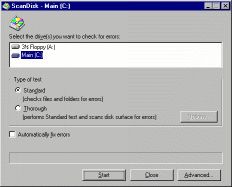 When you start to run Scandisk, you should see a window similar to this:
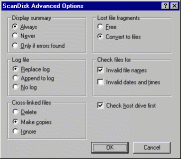 The left image shows the dialogue box presented after clicking the Advanced button. The default settings are shown here, and there is little reason to change them.
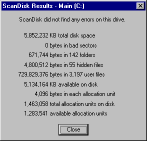 To the right shows the Scandisk results window. "KB total disk space" is the usable size of your disk, left over after the FAT filesystem overhead. "KB available on disk" is the total free space left. "Bytes in each allocation unit" is the cluster size of this filesystem. "Allocation units on disk" and "available allocation units" are the same as "KB total disk space" and "KB available on disk", respectively, except expressed in units of clusters instead of kilobytes. To convert from clusters to kilobytes, you can multiply by the "bytes in each allocation unit" field, then divide by 1024.
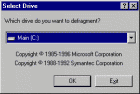 After starting Defrag, you will see a window similar to the left, asking which drive you would like to defragment. Unlike Scandisk, there is no way to select multiple drives simultaneously. In Windows 98, the defragmentation process will start as soon as you hit the `OK' button, so the `Settings' button is also on this window.
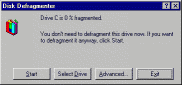 To the right is the main Defrag window. Under Windows 95, you will usually just click the `Start' button. Under Windows 98, Defrag will automatically start working, so there is no need. The `Advanced' button here takes you to Defrag's settings.
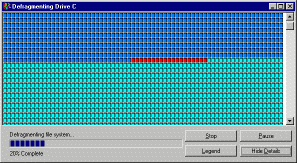 On the left you can see a screenshot of Defrag in action, when Show Details mode is on. Hitting the Legend button will show a chart detailing what the different coloured blocks mean. The Pause button will halt Defrag temporarily, and Stop will cancel your defragmentation.
 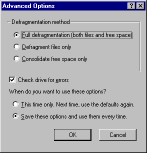 Here is a screenshot of the Defrag settings under Windows 95. The default options are shown here. There are 3 choices for the Defragmentation Method. The first is `Full', which is the best choice. It moves files so that they occupy continuous ranges of clusters, and Windows can read them faster. It also tries to make the space not used up by files into one large block. The second choice is `Files only'. With this option you will get the benefits of defragmenting the filesystem, but since the free space may still be scattered around the disk, new information written to the disk will more easily become fragmented again. The third option, `Free space only', doesn't optimise any of your current files, but will help make sure new ones do not fragment.
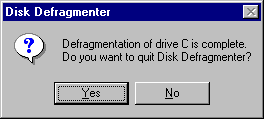 When Defrag is done, it will present you with this window. Just hit `Yes' unless you want to defragment another drive.
The newer version of the disk defragment tool is even much better and easier to operate. Here is how the Windows XP version looks. With fewer buttons and a visual view of you file block you can already determine how fragment the file block are. This one needs a defragmenting for sure. :-) By simply clicking on the defragment button, the system will run the tool and your system will be optimized.
Tuesday, December 29, 2009
What To Do When Computer Boots Up Slow
Tuesday, October 27, 2009
I Found A File Manager
Tuesday, September 22, 2009
Paypal Bank Codes in the Philippines
It's been awhile since I last did my Tech Tuesday post. I'm trying to catch and make up with you guys so here I am! ;)
Anyway this week will all about PayPal and PayPal in the Philippines. Yes, you read that right, PayPal now works in the Philippines.
Not so many years ago I remember having to maintain my US account to keep a PayPal account which I always use for most of my online transactions, thank goodness now I can do it with my local accounts in the Philippines.
If it's your first time here and you are asking the question how, well very simple!
First off, you need to open an account at PayPal.com. Now to transfer funds to Paypal as well to withdraw from it, you need to add your bank account to your PayPal account. This is very easy if you have a credit card or debit card. You can make payments through PayPal that easy...but then if you have funds that you need to withdraw, comes the problem because they only transfer to a Visa card or savings/checking account. To do this you need a PayPal Bank Code.
This PayPal Bank Codes are needed for you to add your savings/checking account to your PayPal...and please take note this is the usual "routing number" that we use for our checking accounts to make online payment. This is another code!
Let me share with you below the list of official PayPal Bank Codes...but please before you make any fund transfer, it will not you any harm to call your bank and confirm. At least you have the CODE ready to lead your bank into understanding that you are looking into PayPal Bank Codes and the routing number as what happened to me when I first asked my bank.
List of PayPal Philippines Bank Codes
| Bank Name | Bank Code |
|---|---|
| ALLIED BANKING CORP | 010320013 |
| AUSTRALIA NEW ZEALAND | 010700015 |
| ASIA UNITED BANK | 011020011 |
| BANGKO SENTRAL NG PILIPINAS | 010030015 |
| BANGKOK BANK | 010670019 |
| BANK OF AMERICA | 010120019 |
| BANK OF CHINA | 011140014 |
| BANK OF TOKYO | 010460012 |
| BANCO DE ORO (& EQUITABLE PCI BANK) | 010530667 |
| BANK OF COMMERCE | 010440016 |
| BANK OF THE PHIL ISLANDS (BPI) | 010040018 |
| CHINA BANKING CORP | 010100013 |
| CHINA TRUST COMML BANK | 010690015 |
| CITIBANK N.A. | 010070017 |
| DEVT BANK OF THE PHILS (DBP) | 010590018 |
| DEUTSCHE BANK | 010650013 |
| EAST WEST BANK | 010620014 |
| EXPORT & INDUSTRY BANK | 010860010 |
| FUJI BANK | 010640010 |
| HONGKONG AND SHANGHAI BANK (HSBC) | 010060014 |
| INTL COMML BANK OF CHINA | 010560019 |
| INTL EXCHANGE BANK | 010680012 |
| JP MORGAN CHASE BANK | 010720011 |
| KOREA EXCHANGE BANK | 010710018 |
| INTL NEDERLAND BANK | 010660016 |
| LANDBANK OF THE PHILS | 010350025 |
| MAYBANK OF THE PHILS | 010220016 |
| METROPOLITAN BANK & TRUST CO | 010269996 |
| PHIL BANK OF COMMUNICATION | 010110016 |
| PHIL TRUST COMPANY | 010090039 |
| PHIL NATIONAL BANK (PNB) | 010080010 |
| PRUDENTIAL BANK | 010150018 |
| PHIL VETERANS BANK | 010330016 |
| RIZAL COMML BANKING CORP (RCBC) | 010280014 |
| SECURITY BANK & TRUST CO | 010140015 |
| STANDARD CHARTERED BANK | 010050011 |
| UNITED COCONUT PLANTERS BANK | 010299995 |
| UNION BANK OF THE PHILS (UBP) | 010419995 |
| UNITED OVERSEAS BANK | 010270189 |
To add a savings/ checking account to your PayPal, log in to PayPal, go to My Account > Profile > Add or Edit Bank Account then fill in the Bank Name, Account Number, and Bank Code.
That's it for my Tech Tuesday! Happy online banking... ;)
Tuesday, July 21, 2009
Cellphones As Bar Code Scanner
Yes...you read it right! Cellphones can be used as bar scanners. Though this is nothing new to the industry and that we may all know that a cell phone can read a bar code label, what is fascinating is what that bar code label can do. Anyone can place a bar code in any media allowing customer access to any information related to it just by scanning it.
How does this work?
Well, this new innovation is currently available for Smartphones, or Mobile PC phones that run software and in order to read these bar codes they must have a camera attached to scan the bar code.
In Japan for instance, phone companies have started loading code readers on new phones allowing users to scan bar codes and get product information such nutritional information about what they are having at let us say McDonald's!
This morning IT Guy was so enthusiastic about this recent innovation and well his creativity stretch the line further as he plan to take advantage of this concept. His thinking is that he can use any cameras (web cams for that matter!) to scan bar codes and he will run a test on how reliable and stable it can be by implementing it in their Warehouse System. IT Guy heads the IT Department of the City and I'm sure if this works this will give the City an enormous savings and will hasten computerization of most of their applications. He is very excited and so am I.
There are just endless possibilities offered by bar codes and with current advances in technology, I am positive that will see these bar code labels being used in our market in the months to come. I am sure this will open a new sector for advertising and will certainly create a new curve in information technology!
So that's it for Tech Tuesday...and I hope I have made you excited about this news!
Tuesday, June 30, 2009
Tips In Creating Special Characters
My Tech Tuesday today is about special characters. This is a character/letters not so common yet er get to use once in a while and as simple as it is I've met several people who just don't know how to create spanish character like N with a tilde (~).
So if you do not know how to make the following --
Here is how simple and easy it is --
for PC
Ñ = Press Alt + 1 6 5 (in the Numerical Pad, that is the sets of numbers at the right part of your keyboard if you are PC)
ñ = Press Alt + 1 6 4 (in the Numerical Pad, that is the sets of numbers at the right part of your keyboard if you are PC)
for Laptop
Ñ = Press Fn (Function) + NmLk (NumLock), Press Alt + 1 6 5 (in the letters keys J, O, I)
ñ = Press Fn (Function) + NmLk (NumLock), Press Alt + 1 6 4 (in the letters keys J, O, U)
Tuesday, June 16, 2009
PC Shortcut Keys
While my Tuesday's Tales was so early, my Tech Tuesday is running a bit late...but here goes!
I've been battling the whole day on what to feature for this week as I was initially planning of making a follow up post in switching domains. Looks like I don't have enough time for that so here is a quick computer tips...some basic PC shortcut keys!
Below is a list of shortcut keys which most of us are already familiar with --
F1 - Universal Help in almost every Windows program.
Alt + F - File menu options in current program.
Alt + E - Edit options in current program
ALT+F4 - Quit program
ALT+TAB - Switch between open programs
Ctrl + A - Select all text.
Ctrl + X - Cut selected item.
Ctrl + C - Copy selected item.
Ctrl + INSERT - Copy selected item
Ctrl + V - Paste
Ctrl + Home - Goes to beginning of document.
Ctrl + End - Goes to end of document.
Ctrl + Left arrow - Moves one word to the left at a time.
Ctrl + Right arrow - Moves one word to the right at a time.
CTRL+ESC - Open Start menu
Home - Goes to beginning of current line.
End - Goes to end of current line.
Shift + Insert - Paste
Shift + DELETE - Cut selected item/ Delete item permanently
Shift + HOME - Highlights from current position to beginning of line.
Shift + END - Highlights from current position to end of line.
Windows Logo+L - Lock the computer (without using CTRL+ALT+DELETE)
Personally, Crtl + C, Crtl + V and Crtl + Z are the shortcut keys which I always use.
When I am working on somethig, writing, doing graphics or whatever and I make a mistake. Guess what I do? That's right, hit Ctrl-Z! That's the “undo” command and it seems to be the (almost) universal solution for mess-ups and mistakes!
BUT what about when you want to undo an undo? Hmmm...sounds messy, doesn't it? Good news, there is another shortcut keys which is really easy and works almost anywhere!
Just hit Ctrl + Y. Yes that easy! This key combination will bring back the mistake you thought you made as quickly as it went away! ;)
Hope you learn something new this week...
Thursday, June 11, 2009
Short But A Lot!
Hi folks!
I am running late here...the subdivision where we live had power outage the entire day, that's evening for most of you. Even if I have 2 laptops with sufficient charge, my wireless internet needs power. Pfft. Power came back around 6pm and I was already in oblivion.
Anyway, I'm catching up...and will visit WFW and Thankful Thursday participants later. As I promise myself my thankful list this week, here goes my short list...short but A LOT!
- One of my favorite blog Violence Unsilenced which has inspired many has been nominated as The Most Inspiring Blog. Violence Unsilenced was created with the sole intention of shedding light on the epidemics of domestic violence and sexual assault by giving their survivors a voice. This blog echoes different stories from different people...their voices have inspired many and hopefully will continue to be an inspiration! I invite YOU ALL to vote for this inspirational site this will mean so much for me and to so many people!
- I got A NEW JOB! In my post yesterday, God Is Good I mentioned that I'm going later for a telconference for my job offer...and I did. Oh boy was it nice! As I was trying to make a list on all the pros and cons of moving to a new job after being with my current employer for 3 years the only thing that seems to go against moving to a new one was the tenure I have with the current one. You see here in the Philippines, most employees undergo 6 months probationary period afterwhich the employee's performance is evaluated and only then he/she is hired as a regular employee. A regular employee gets to enjoy more benefits and more than anything security of tenue. I was willing to risk that. BUT guess what?! They hired me as a regular employee outrigh. No more probationary period for me...WOOT! God is indeed good...and He is good all the time!

- Last week I launched to Tuesday memes, Tech Tuesday and Tuesday's Tales! I am so happy with my readers receive them...and I am so thankful for the people who participated. I really appreciate you sharing your fun memories with me and with the other participants!
Those are the major things I have for this week...I'm sure as soon as I hit published button I will remember other things...but they may not be on this list...I may miss my Thankful Thursday, one thing is sure I am thankful for everything everyday!

Please check Thankful Thursday
and together let us celebrate
all the things we should
be grateful for!
Tuesday, June 09, 2009
The Joy and Pain of Switching Domains
Some of you may have noticed that I have switched to my own domain -
I have been meaning to do that and wished I did it earlier. Anyway, I wanted to get myself my won domain and I got it and I am happy with it.
However, with the joy of having my own domain comes the pain. My PageRank has suffered over the past weeks. To be honest it is not something I am so particular with, but sometimes it kind of feel good seeing you up there, okay?! :)
So what happened to my PageRank?
Well as most bloggers or site admin go through, once you change to a new domain you lost links. You many be able to point your old site to your new site so as not to lose traffic (Like what I did so successfully, thanks to this amazing tips on how to switch to a new domain!) yet, there are just some bloggers/people online who linked to you through old domain.
For my case most of my friends here are linked to my old mariposa.blogspot.com link and now I am on
Anyway...I'd say nothing can take away the value of having your own domain. It's something one can take pride with. For only $10 or less...I feel I have my own identity here. LOL
I will be talking more about this come next Tech Tuesday, but for now...let me just ask you guys a favor, if you are linking with me, I'd really appreciate it if you can update the link to my new domain --
And for those who already did, THANK YOU so much!
How about you? Planning of getting your own domain? I'd say now is the time to do it. Don't worry if you have nowhere to host it, as Blogger can host it for us!
If you have related experience please feel free to share them, I'm sure those information will mean a lot to fellow bloggers. This is what Tech Tuesday is for!
Tuesday, June 02, 2009
Tech Tuesday
I saw something online which I couldn't resist posting here...I just enjoyed it so much and hopefully you get to learn something from it while laughing at it!
Though I try not to make several post in one day, I feel it doesn't matter...so I might as well go ahead.
Also, just a thought came to me today...I guess every Tuesday I will be doing two activities/memes, Tuesday's Tales which is just below this post...and something like this post for Tech Tuesday. I cannot promise to do both always, yet I will do at least one every Tuesday.
Tech Tuesday will about anything related to technology...moreso on information technology, specifics on computing and internet. I can also talk about gadgets, but will really try to make the topics helpful to fellow bloggers.
I welcome guest writes, especially those who are technical writers who wants to share something to my crowd. For fellow bloggers, if you have some questions which are technical in nature and you think might be a good topic to discuss here, you may email them to me before the weekend so I can prepare a post for it comes Tuesday. If issues are too technical, I can get help from the IT Guy or ask help from my network. ;)
For today's entry...I'd like to post this word tip from WorldStart.
Q: What does it mean to "boot" your computer?
A: Booting a computer is a simple procedure that's preformed when it acts up. Let's say it's the 20th time in an hour that Windows has locked up. You simply lift the computer up at about chest-high level and drop kick it. It doesn't always fix the problem, but it does tend to make you feel a little better.
The term originated from the old west cowboys. Their computers (running Win 1870) would often cause them no end of grief and would be riddled with thousands of triangular dents produced from the tips of those boots they wore.
JUST KIDDING - sorry, couldn't resist.
When you start (or re-start) your computer, that's called "booting". If you want to get all technical, when you power on your computer, it's a "cold boot". Restarting it is a "warm boot".
Tossing it out the window is just giving it "da boot".
This article is republished with written permission from the WorldStart.


